
Patient Journey Intelligence — Takeda
Designed a governed, AI-assisted patient journey intelligence workspace for Takeda's insights and analytics teams — turning static reports into an interactive experience where users ask natural-language questions, receive validated answers with evidence and governance context, and route coverage gaps into a tracked insight request workflow.
Guidehouse: AI Studio – Takeda · 2026
A rapid business development prototype for Takeda's insights and analytics team, designed in roughly one week to demonstrate a governed, AI-assisted alternative to the team's existing static reporting model.
Overview
Every follow-up question created a new request cycle
Takeda's team had patient journey analytics. The problem was the delivery model: each output was a slide deck that answered a fixed set of questions. Every follow-up question became a new analytics request, creating delays and repeated effort for both users and the analytics team behind them.
Static exploration
Users needed to move from a patient journey overview into specific questions without triggering a new analysis cycle
AI governance
Answers had to show whether they came from validated insight coverage — not be generated freely from unvalidated data
Coverage gaps
When coverage was missing, the system needed to route into a governed workflow instead of fabricating an answer
- Role
- UX/UI Designer
- Timeline
- ~1 week, time-boxed BD prototype
- Scope
- Concept to demo-ready prototype
- Primary Users
- Insights and analytics leads
UX Strategy
A guided workflow, not an open-ended chatbot
The experience needed to feel conversational while still being structured enough to show governance. An open-ended chatbot would obscure the validation layer. A pure form would feel like a SharePoint intake. The answer was a guided, step-by-step flow that balanced user simplicity with a credible backend story for pharma decision-making.
- Snapshot — orient users with patient journey context before they ask anything
- Ask — plain-language question entry with examples and recent history
- Review — surface close validated reports before generating anything new
- Refine — collect the minimum extra detail needed to narrow intent
- Answer or Request — return a validated answer, or explain why a governed request is required
- Track — show request status so nothing disappears into a queue
End-to-EndRequesterJourney
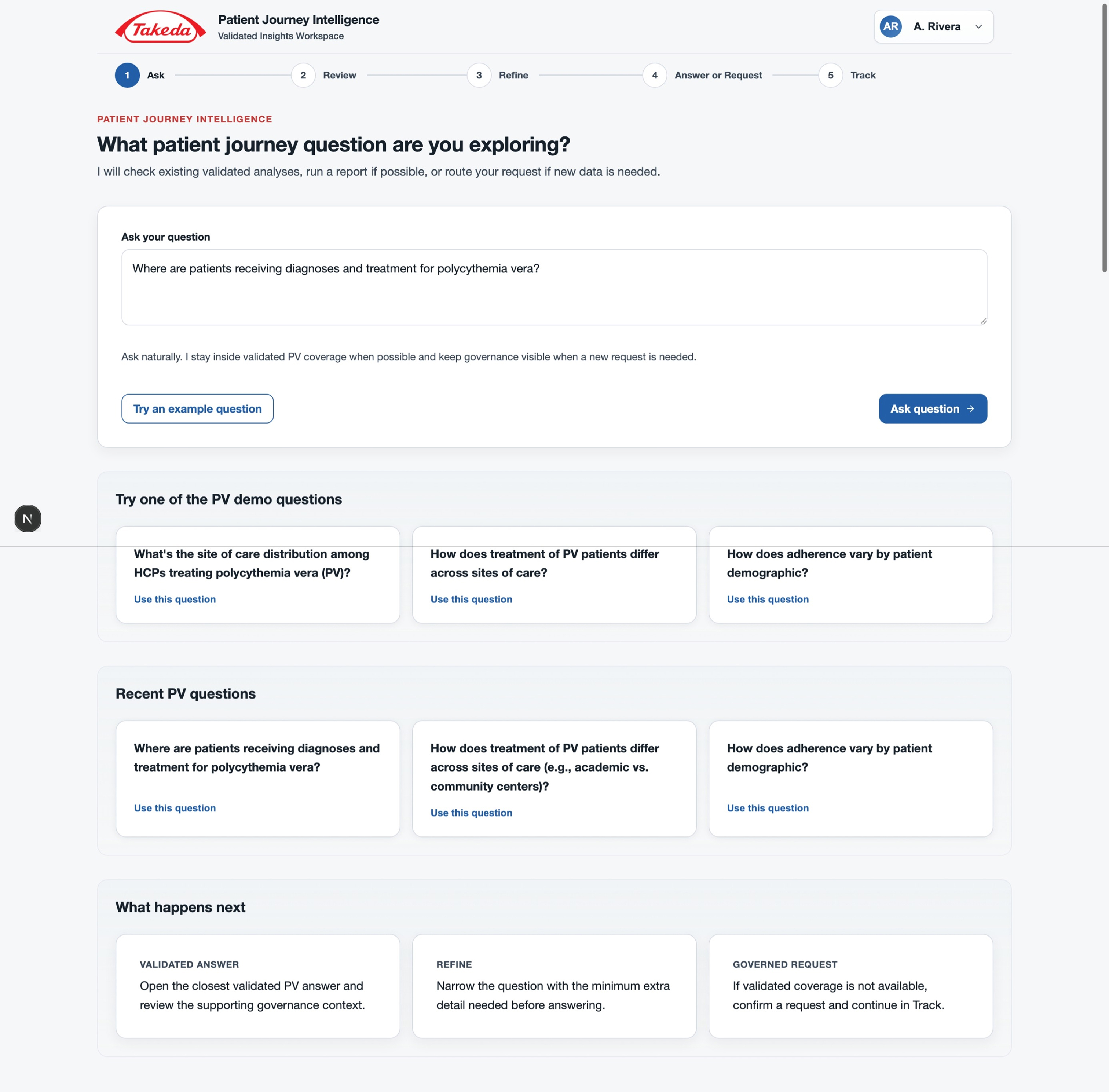
Ask — plain-language entry with example questions
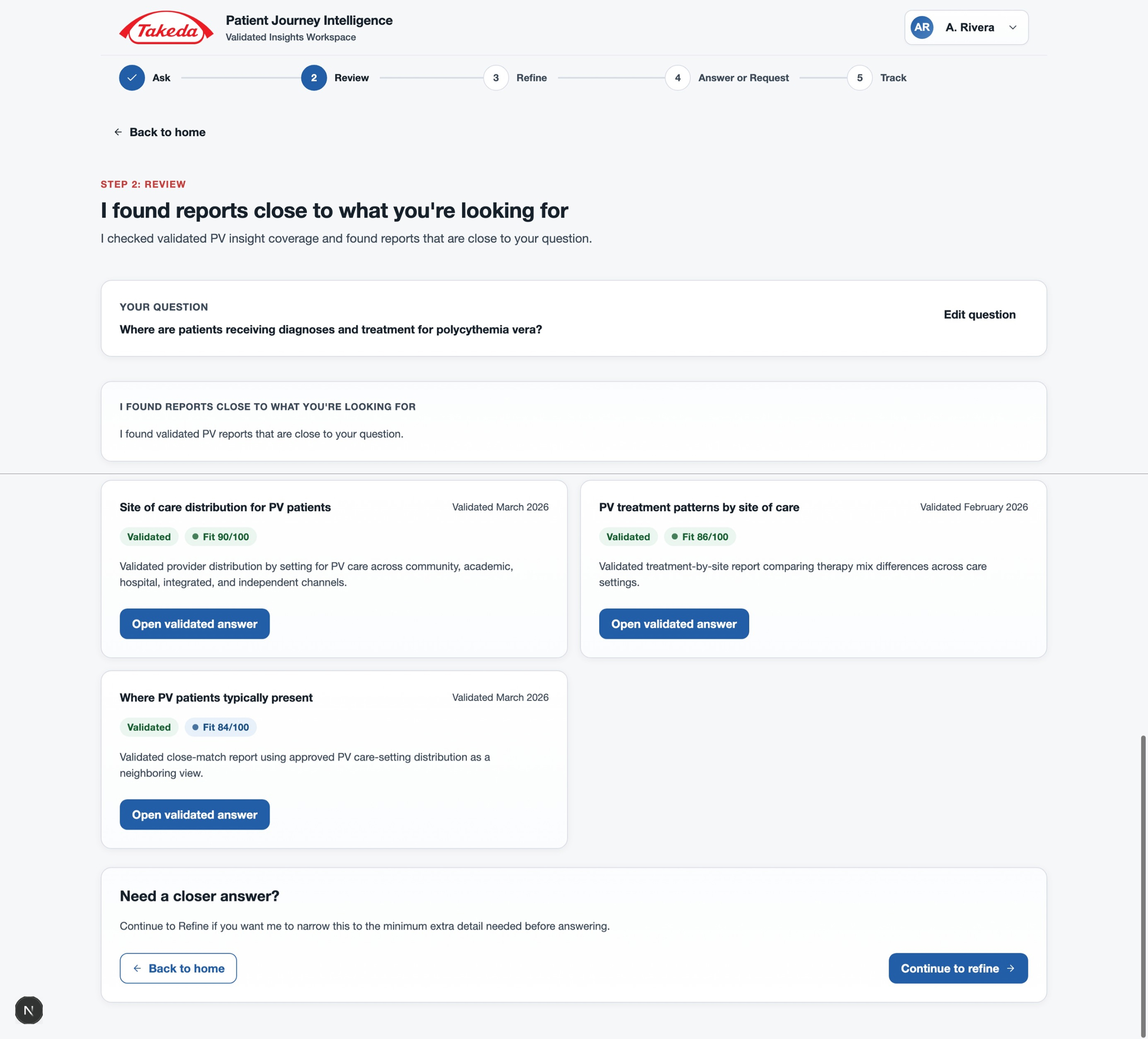
Review — validated report matches with fit scores
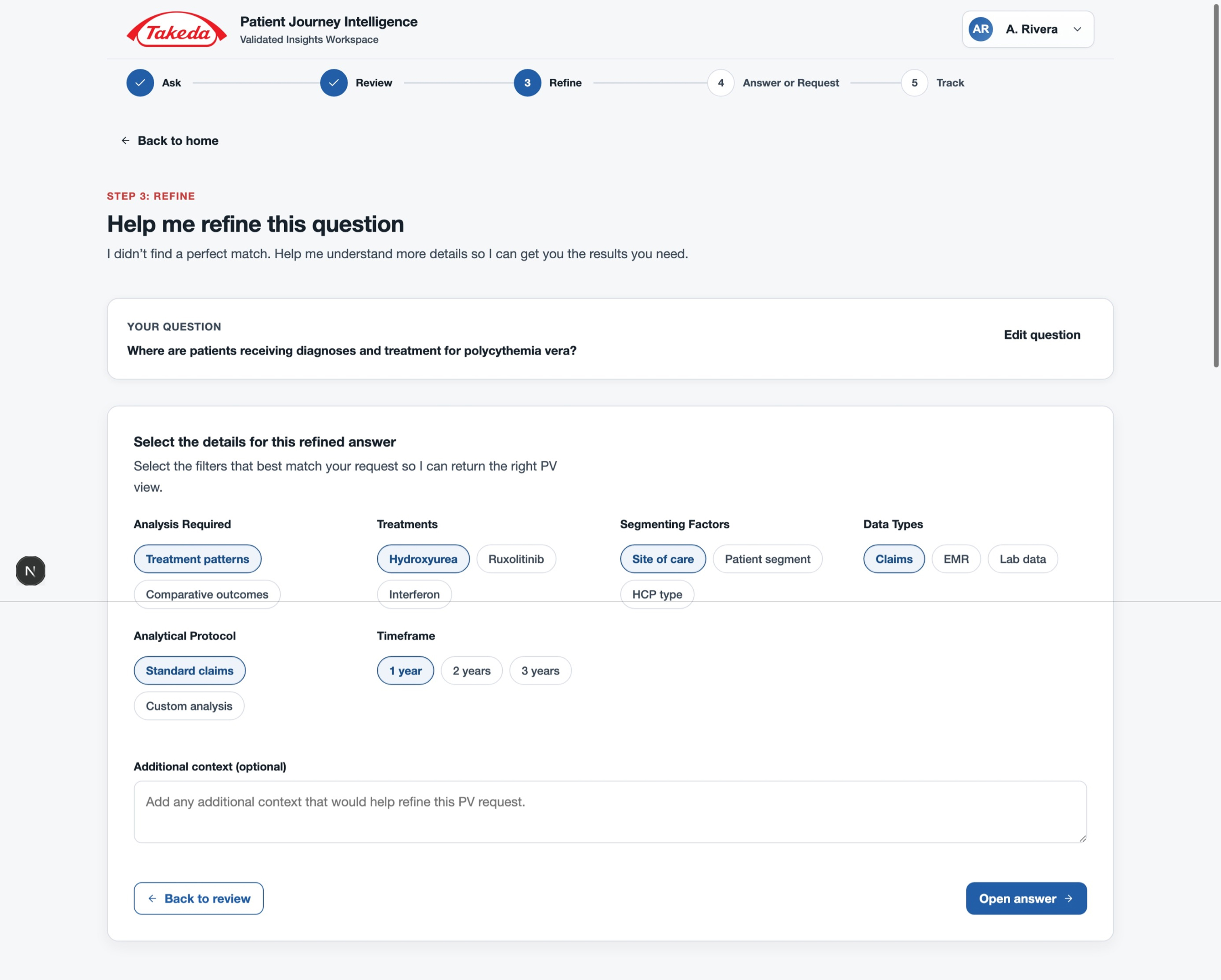
Refine — chip-based narrowing with minimal required fields
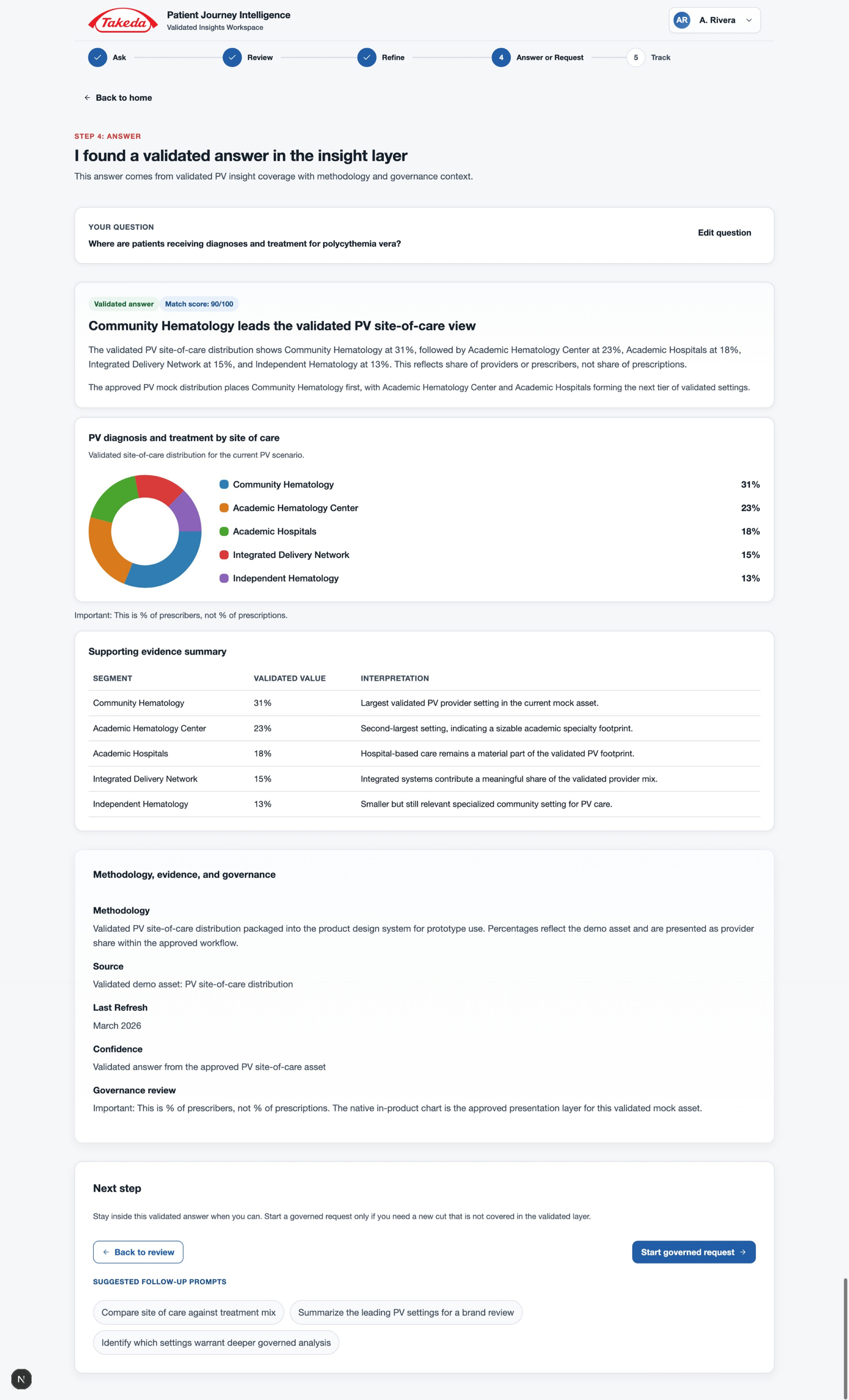
Validated answer — insight, chart, evidence, and governance context
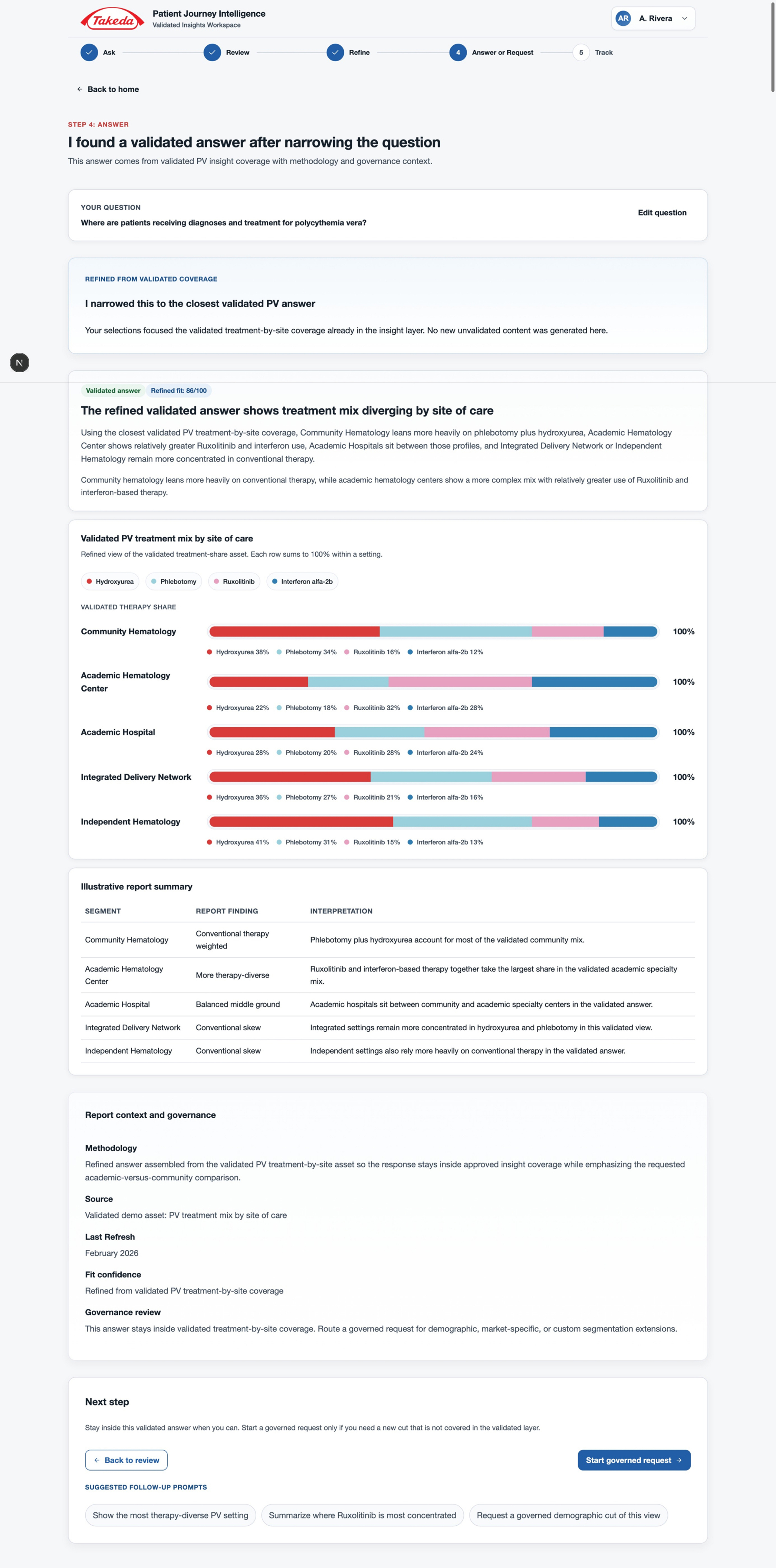
Refined answer — targeted insight after narrowing
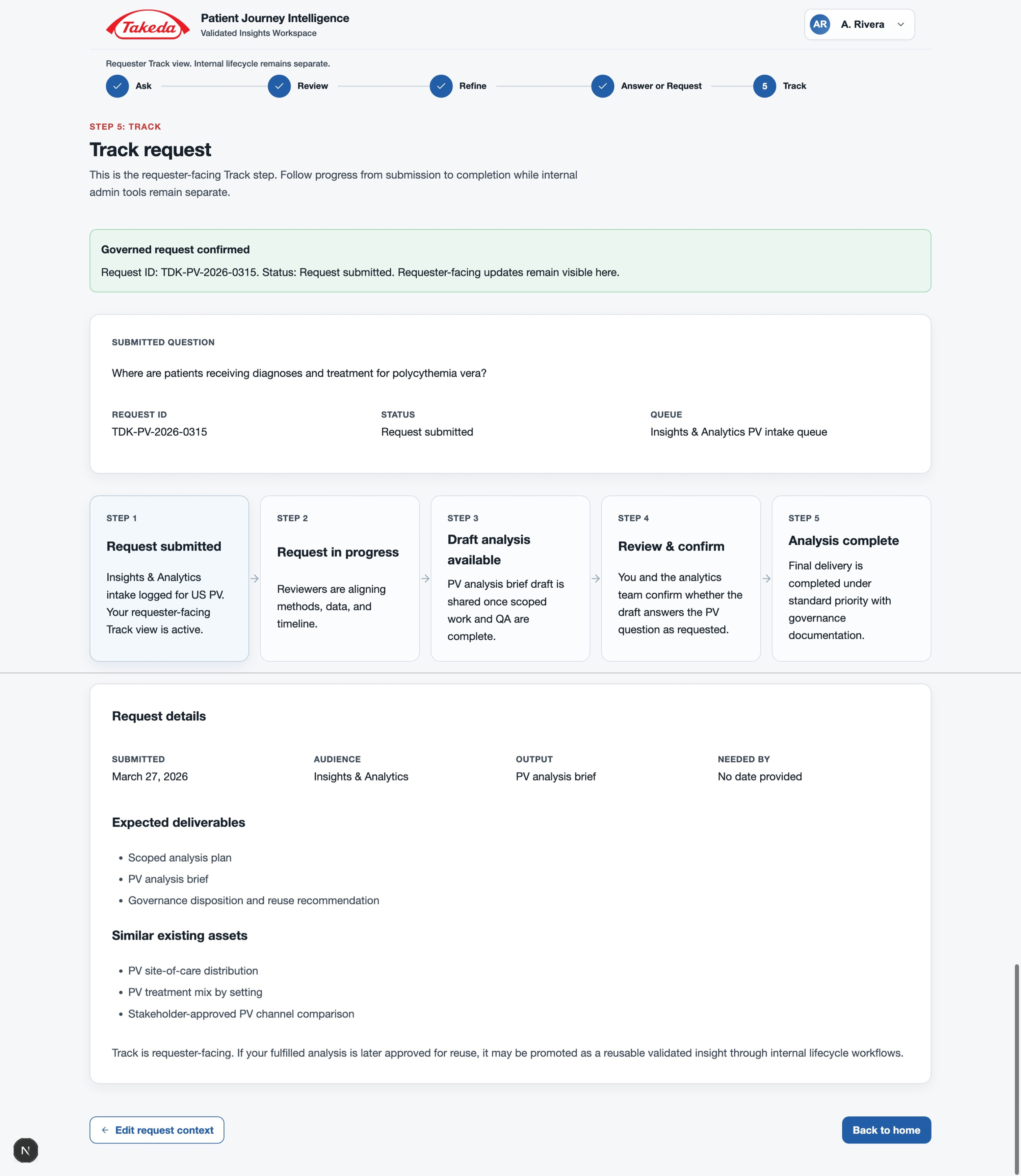
Track — requester-facing lifecycle with status and progress
Key Design Decision
Orient first, ask second
Stakeholders flagged early that users might not know what to ask until they first saw the patient journey. Starting on a question box would leave them without the context to form good questions. The team wanted an entry point resembling a traditional BI dashboard: summary cards, journey stages, distributions, and key insights before the AI-assisted flow begins.
This positioned the product as analytics plus AI, not a replacement for the context users already expected. The Snapshot was built as a rapid initial concept for client demonstration — establishing the direction before moving into detailed hi-fi work.
- Executive summary cards
- Journey stage analysis
- Patient distributions
- Key insights panel
- Clear CTA into the question flow
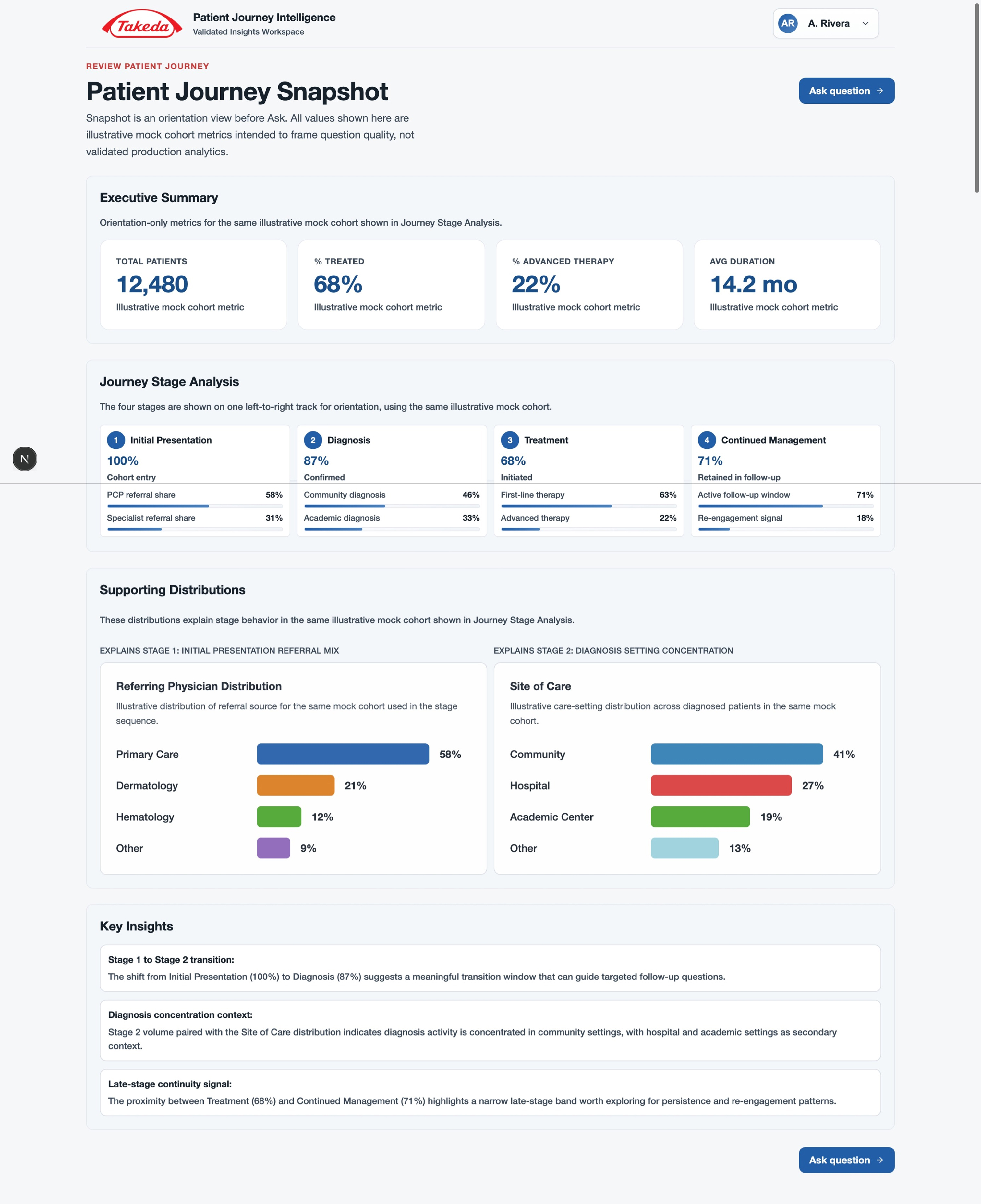
Initial concept — oriented users before the ask flow
A simple, demo-friendly Ask interface
The Ask screen focused on a single natural-language question box with example PV questions and recent history. No filters, no configuration up front. The demo question — Where are patients receiving diagnoses and treatment for polycythemia vera? — connected directly to the validated answer path, keeping the demo flow coherent end to end.
Ask — plain-language entry with example questions and recent history
Key Design Decision
Validate coverage before generating anything
The Review step made the validated insight layer visible. If related reports existed, users could open a validated answer immediately. If not, they moved to Refine. This made clear the experience was a governed retrieval flow, not a chatbot.
Stakeholders were firm: Refine should not feel like a SharePoint form. The screen used selectable chips across analysis type, treatments, segmenting factors, data types, and timeframe — with optional free-text only at the end.
Review — validated report matches with fit scores
Refine — chip-based narrowing, no long forms
Key Design Decision
Two validated answer paths
The prototype demonstrated two successful outcomes. When a question was covered, the system returned a validated answer: confidence badge, plain-language headline, narrative, chart, evidence table, and suggested follow-ups — with governance context visible throughout. When refinement was applied, it produced a more targeted answer: treatment differences across sites of care shown as stacked bars, supported by the same governance layer.
Validated answer — confidence, insight, evidence, governance
Refined answer — targeted insight after chip-based narrowing
Governance
Route gaps, never hallucinate
For questions not covered by the validated layer, the system explicitly avoided generating an unsupported answer. The gap state screen explained that coverage was missing, confirmed no unvalidated answer would be generated, and offered a direct path into a governed insight request. Making that boundary explicit and actionable was one of the most important trust-building moments in the flow.
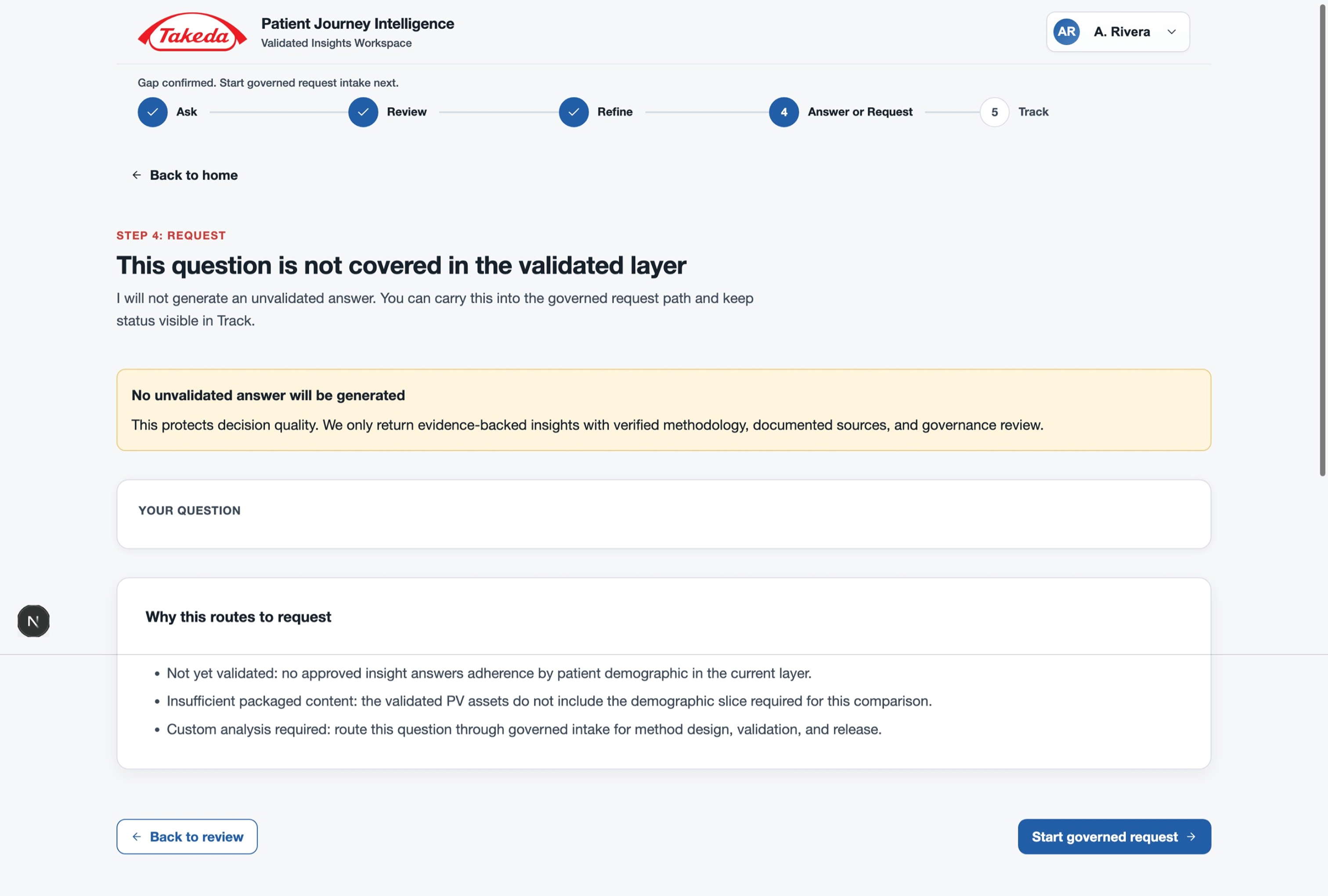
Gap state — coverage miss routes to governance, not a fabricated answer
Tracking requests and expanding the insight layer
The Track screen closed the requester-facing loop. Nothing disappeared into a backlog — every submitted question became a visible, trackable work item with a clear status and expected outcome.
- Request ID and current status
- Queue position and fulfillment team
- Step-by-step progress tracker
- Submitted question and request details
- Expected deliverables and timeline
- Similar existing assets already in the validated insight layer
Internally, fulfilled analyses could be reviewed for reusability and promoted through a DEV to UAT to PROD lifecycle — so answered questions eventually reduced the gap rate for future users.
Track — requester-facing lifecycle, status visible while internal fulfillment continues
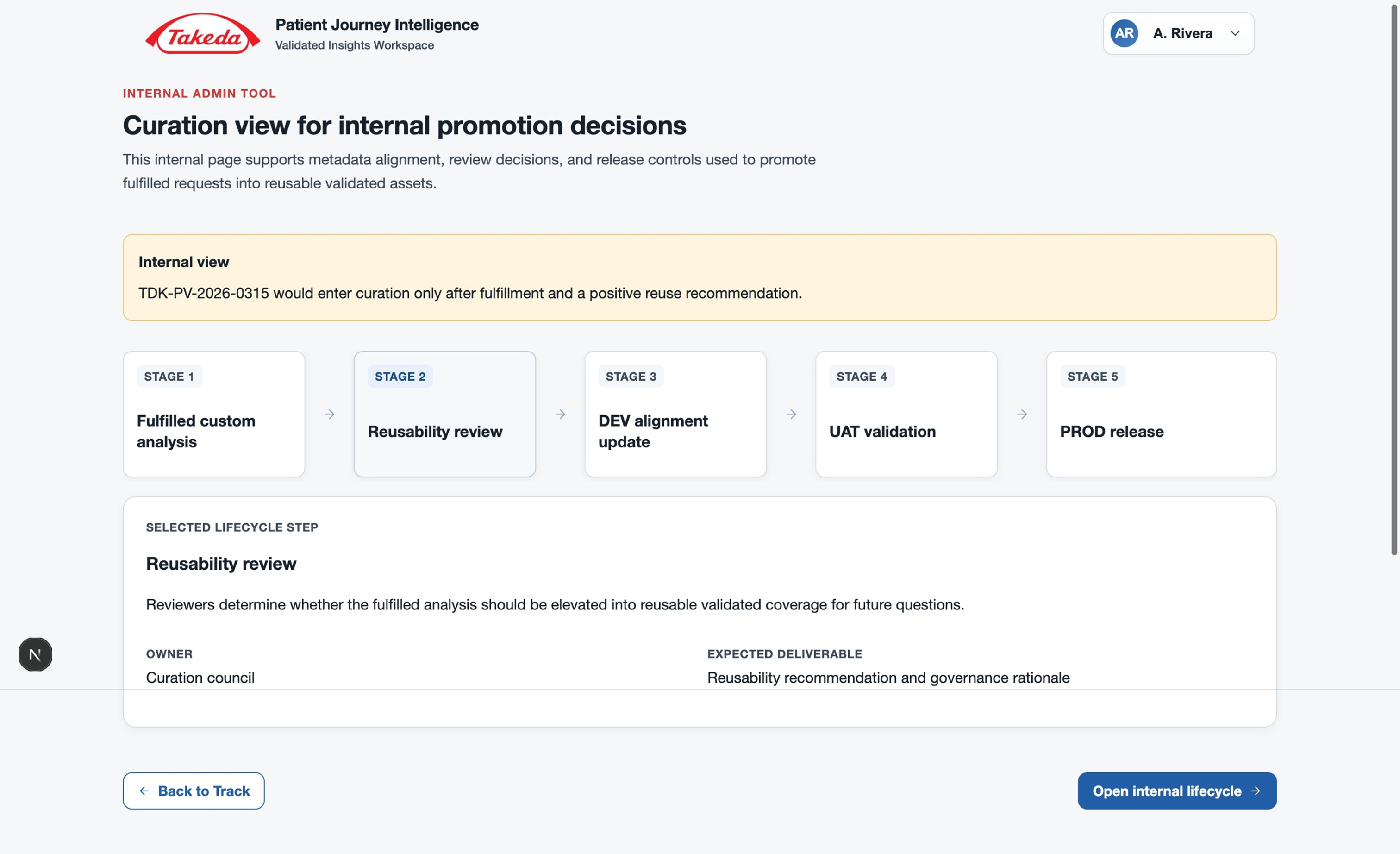
Curation — internal reusability review for fulfilled analyses
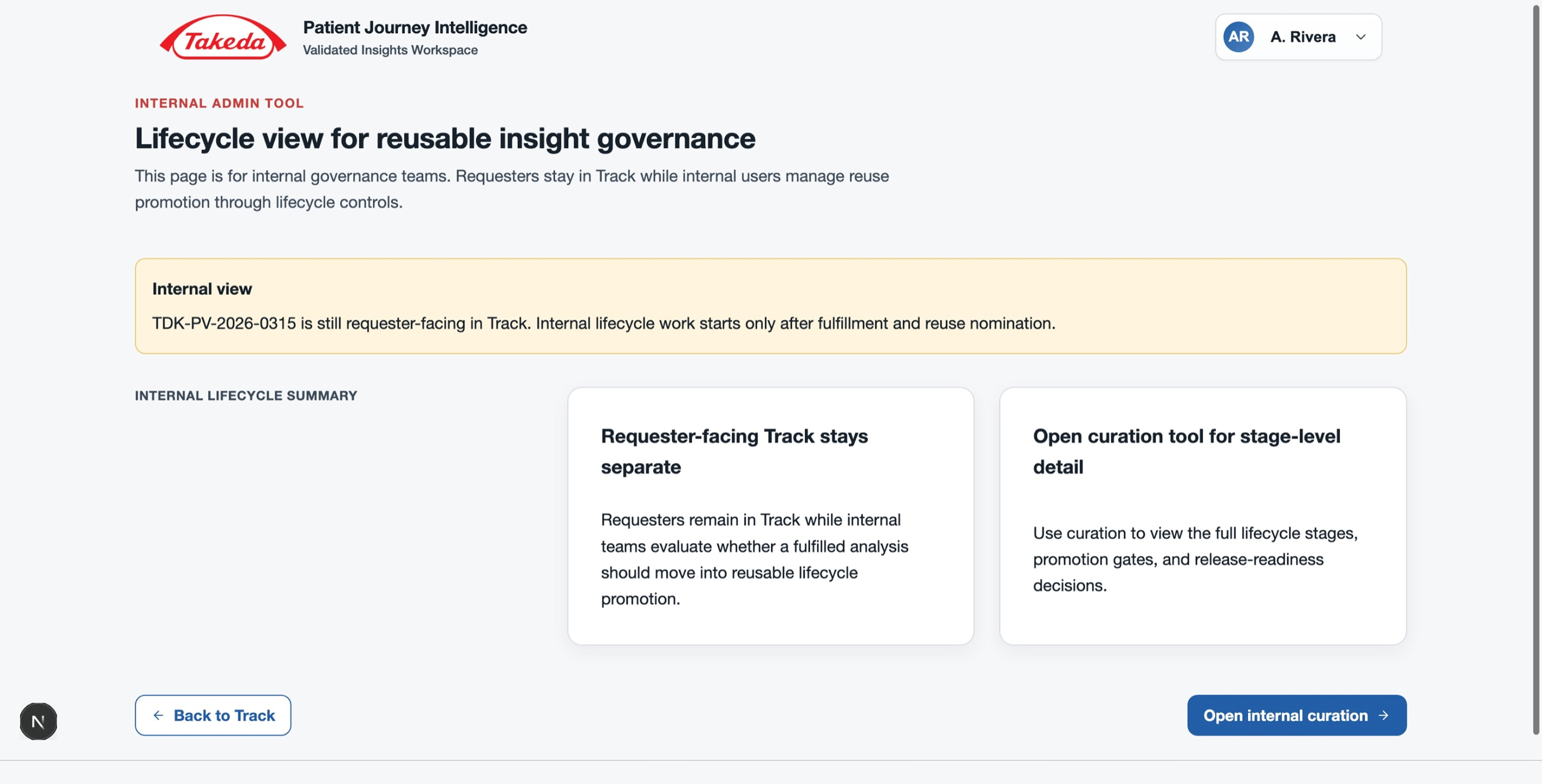
Lifecycle — DEV to UAT to PROD promotion controls
Design Process
Rapid prototyping under evolving requirements
Requirements were still forming at kickoff. I created a design kick-off document to capture what was known, what was missing, and where the team needed alignment — then used a hybrid AI-assisted process to move fast without losing coherence.
Understand requirements
- Captured direction from meetings, source documents, and evolving strategy slides
- Created a kick-off doc mapping known requirements, open questions, and gaps
- Asked clarifying questions: primary user, workflow being replaced, real demo questions
Structure the UX flow
- Translated evolving requirements into a 6-step guided workflow
- Defined the split between requester-facing experience and internal admin
- Identified the three demo paths: validated answer, refined answer, and gap routing
Prompt for prototype speed
- Used ChatGPT to synthesize stakeholder context into concise, copy-paste prompts
- Directed GitHub Copilot through each screen with self-contained instructions
- Compensated for Copilot's design limitations through manual UX judgment at each step
Refine and share
- Reviewed and manually refined UI direction for each screen
- Shared screenshots for stakeholder feedback and updated based on comments
- Added the Snapshot entry point after early stakeholder feedback — it was not in the original scope
Reflection
Moving fast without losing governance
This was one of three engagements running in parallel — J&J APEX, Takeda, and a third client — at a point where my team had limited capacity to take on more from this client group. The constraint forced a disciplined process: convert requirements into a UX flow fast, synthesize stakeholder notes into structured prompts, iterate directly with the team instead of through a PM layer.
Recognized for delivery
A partner-level lead recognized the output quality and turnaround speed to my second-line manager across all three engagements. When the client team needed additional design capacity, two senior designers were brought in to continue the work. The handoff made clear how much had been delivered, and at what pace.
The Takeda prototype showed that a concept as governance-heavy as patient journey intelligence could be made approachable. Not by simplifying the underlying logic, but by making the right path obvious at every step: what is validated, what is not, and what to do when coverage runs out.
WhatIdesigned
- Governed AI insight workspace from early-stage concept to demo-ready prototype — requirements, UX flow, and all screens
- Patient Journey Snapshot entry point bridging traditional BI dashboard context with the AI-assisted flow
- Natural-language Ask interface with example PV demo questions, reducing cognitive load on first interaction
- Review and Refine steps surfacing validated coverage before generating answers, with chip-based narrowing instead of long intake forms
- Two answer paths: direct validated answer with evidence and governance, and refined validated answer for more specific queries
- Gap state routing — coverage misses become governed insight requests, never fabricated answers
- Admin curation and lifecycle views showing how fulfilled analyses become reusable validated insight assets over time